Paste a listing link — video in minutes Your branding on every render Voiceover, music & captions — done for you Powered by the Mister Cat render engine
AI video marketing for real estate

Paste the listing link. Get the listing video.

Photos, facts, and neighborhood, assembled into a branded video buyers actually watch. In minutes. For every listing you take.

MLS-ready 16:9 No filming, no editing First month free

Where buyers actually are

Your buyer is online, scrolling, and overwhelmed.

NAR's 2026 buyer research is blunt: the search is digital, video is everywhere in it, and the hardest part of buying is finding and understanding the right property. That's the job a listing video does.

52%
of buyers find their home online
More buyers find the home they end up purchasing on the internet than through their own agent. 46% start their entire search there. The scroll is the new curb appeal.
NAR 2026 buyer research
52%
use video sites while searching
Half of all buyers watch video during their home search. If your listing has no video, half your market is watching someone else's inventory.
NAR 2026 buyer research
56%
say finding the right home is the hardest step
Not financing. Not paperwork. Understanding which property fits. A guided video answers that question before the buyer ever calls — and the buyers who do call are the real ones.
NAR 2026 buyer research

Today, the buyer does the assembly work. Kioto does it for them.

A photo gallery makes the buyer piece it together alone: 40 photos, a wall of text, a map in another tab, HOA fees in a PDF, schools on a third site — then they text it all to a spouse and try to remember which photo had the office.

Photos show the property. Facts explain it. The neighborhood sells the decision. Kioto assembles all three into one guided story: the narrator walks the photos in the right order, the price, beds, baths and standout facts land on screen as they're said, and your brand is on every second of it.

Buyers rate photos (81%) and property details (77%) the most useful media on a listing. A Kioto video isn't a rival to those — it's both of them, in motion, doing the selling for you.
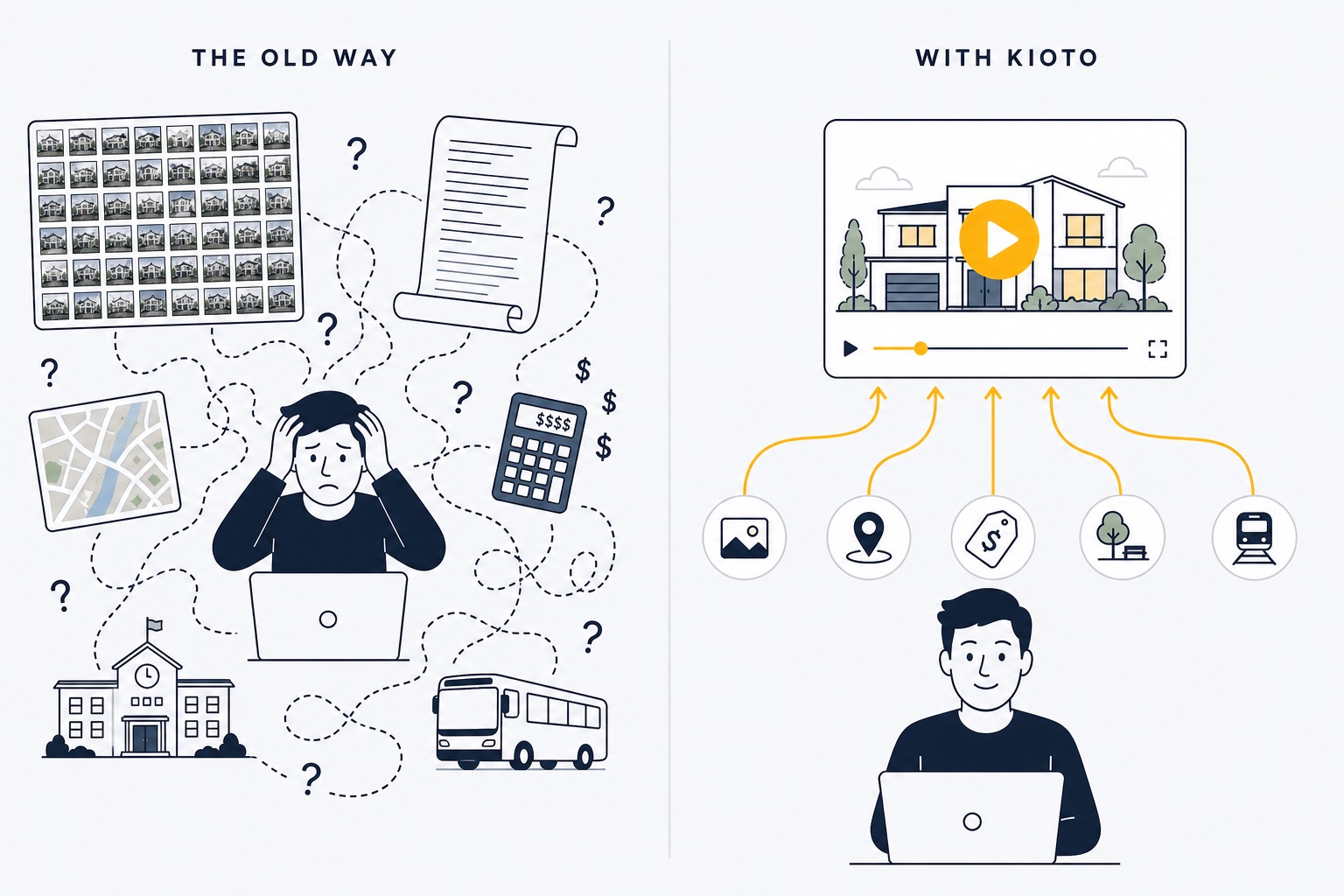
Before: a buyer overwhelmed by disconnected photos, maps, and fees. After: one guided Kioto video
And here's your opening: buyers want video, yet only a small fraction of agents ship a video for every listing — because production was slow and expensive. It isn't anymore. Be the agent whose every listing gets the full treatment.

How it works

One link in. A finished listing video out.

No filming, no editing timeline, no waiting a week on a videographer.

STEP 1

Paste the listing link

Drop in a Zillow link to the property (Redfin and Realtor.com coming soon) — Kioto pulls the photos and auto-populates the details: price, beds, baths, square footage, standout features. Or paste your own photos and type the highlights. Every field stays editable.

seconds, not spreadsheets · no manual data entry
STEP 2

AI produces the video

The Mister Cat render engine writes the walkthrough narration, generates the voiceover, sequences your photos with motion, lays a music bed, and burns in captions — with your logo, colors, and contact info applied.

minutes per render · voiceover + music + captions
STEP 3

Post it everywhere

Every render comes out MLS-ready in 16:9 — YouTube, email, and listing-page ready. Download and post the same hour your listing goes live — when the first-week inquiry window matters most. Vertical 9:16 for Reels and TikTok is coming soon.

MLS-ready 16:9 · one-click download

Why Kioto

Not a slideshow. A property-and-place story.

Slideshow apps loop your photos over stock music and call it a day. Kioto builds the video a serious buyer needs — from what your listing actually says.

01

Real facts, not filler

The narration is written from your listing's actual data — price, beds, baths, square footage, the features that matter. No invented rooms, no fake views, no "stunning open concept" boilerplate. Every line is yours to edit before render.

02

The home and the location

Nobody buys a house apart from its address. Kioto's format is built to carry the full decision — the property, its costs, and its place — so buyers understand the listing instead of just flipping past it.

03

One listing. Every channel.

MLS-ready 16:9, YouTube-ready, email-ready — plus a hosted listing page on your own kioto.ai agent site, published in one click. Post the video everywhere buyers scroll, the same hour the listing goes live.

04

Your brand on every second

Intro and outro slates, your logo, your colors, your contact info, captions burned in for the sound-off scroll. Set your brand kit once — every render comes out looking like you paid a studio.

05

Minutes and dollars. Not weeks and hundreds.

A videographer runs $300–$1,200 and days per listing. Kioto renders in minutes and works out to about $2.50 a video — cheap enough to give every listing the treatment, not just the trophy ones.

06

Claims you can stand behind

Videos describe what the photos show and what the data says — objective, factual, fair-housing-conscious wording. Your name is on this marketing. We treat it that way.

One Kioto video distributed to MLS, YouTube, email, social, and your agent website
One render, everywhere the buyer looks — MLS, YouTube, email, social, your site.

See it for yourself

This is an actual Kioto render. Nobody filmed anything.

A real render from the platform: the listing's photos become the tour, the AI narrates the walkthrough, and the key facts — price, beds, baths, square footage — stack up on screen as they're mentioned. Start to finish, minutes.

624 Guava Ave demo render — photos in, narrated listing video out. Voiceover, captions and fact overlays generated automatically.
A live Kioto agent listing page: 8384 Heritage Club Dr, West Palm Beach — with the rendered tour video

And it doesn't stop at the MP4

Every video gets its own listing page. On your own agent site.

This is a real one — a West Palm Beach listing rendered by Kioto and published to the agent's hosted page in one click: tour video, price, beds, baths, and contact details, at a link you can drop into any email, text, or bio.

See the live page →

What a render includes

One listing in. A complete video kit out.

Not a slideshow template — a produced marketing video. Each render ships everything a listing needs to perform on the MLS and on social, in one pass.

ASSET · MLS CUT16:9
Full walkthrough video
Narrated tour of every room · property facts on-screen · your branding
MLS readyYouTube & email ready
ASSET · YOUR BRANDAUTO
Agent branding, applied
Intro & outro slates · logo, colors, contact info · captions burned in
sound-off watchablebrand kit set once
ASSET · DETAILSAUTO
Listing data, structured
Price · beds · baths · sqft · features — pulled, not typed
from listing linkfields editable

representative renders · your account fills with the real thing from listing one

Auto-populated details

Price, beds, baths, square footage, and features are pulled from the listing link and become the narration, on-screen text, and highlights. Override anything before you render.

Voiceover, music, captions

A narrated walkthrough script, natural AI voiceover, beat-matched music bed, and burned-in captions — viewers scrolling with the sound off still get the full pitch.

Your brand, every render

MLS-ready 16:9 with your logo, brand colors, and contact info applied automatically. Set your brand kit once. A vertical 9:16 cut for Reels and TikTok is next on the roadmap.

The honest comparison

Every serious option, side by side.

Prices and features verified June–July 2026 against each vendor's site. The short version: per-video tools get expensive at volume, generic AI tools don't understand listings, and videographers take a week per property.

Kioto vProp Reel-E AutoReel Videographer DIY (Canva/CapCut)
Listing-link import Yes — listing link auto-fills details + photos Yes — address lookup Yes — listing URL pulls photos Realtor.com photo import only No — you brief them No — manual everything
Voiceover + music + captions Yes — all three, every render Voiceover + music AI voiceovers built in Captions; no narration If you pay extra for it You record it yourself
MLS 16:9 + vertical 9:16 MLS 16:9 today · 9:16 coming soon Yes — both formats Yes — 4 videos per listing One format per render Usually 16:9 only Re-edit per format
Turnaround per listing Minutes — same hour the listing goes live ~3 minutes ~2 minutes 5–15 minutes 3–7 business days 20–60 min of your evening
Entry price First month free · then $19.99/mo for 8 (~$2.50 each) $19/video · subs $19–229/mo $44–59/mo (3 listings) Free tier · ~$30–60/mo $300–1,200 per listing Free — costs your time
What's behind it A full AI video platform (Mister Cat) — not a single-purpose widget Single-purpose tool Single-purpose tool Single-purpose tool One human's calendar Your patience

Pricing

Priced in listing videos. Not credits, not minutes.

One render is one finished listing video — voiceover, music, captions, and your branding included. Every plan starts with a free month: $0 today, cancel before it ends and you pay nothing. Secure checkout by Stripe, account ready in seconds, cancel anytime from the billing portal.

Checkout was cancelled — no charge was made. Pick a plan whenever you're ready.
Monthly Annual~2 months free
FREE

Your first listing video is on us

1 finished video with voiceover, music & captions — watermarked, no card required. See your own listing rendered before you spend a dollar.

Create free account

Creator

$19.99/mo
First month free — $0 today
≈ $2.50 per listing video · billed monthly
  • 8 listing videos per month
  • MLS-ready 16:9 in every render
  • Auto-populate from listing link or photos
  • AI voiceover, music & captions
  • Your branding on every video
  • 3 active projects

Studio

$129/mo
First month free — $0 today
≈ $2.15 per listing video · billed monthly
  • 60 listing videos per month
  • Everything in Pro
  • Built for teams & brokerages
  • Priority support
  • Coming soon: 3 seats + multi-brand kits
  • Coming soon: white-label output

Videographer math: one traditional listing video runs $300–$1,200 and takes days. Creator pays for itself on the first listing of the month — and covers seven more. Your card is charged $0 at checkout; the first payment lands only after the free month, and cancelling before then costs nothing. secure checkout by stripe · first month free · promo codes supported · cancel anytime from the billing portal

Under the hood

Kioto is not a wrapper around a slideshow template. It runs on Mister Cat, a production AI video platform that renders fully produced, narrated videos — script, voiceover, visuals, music, captions, and branding in one pipeline — and already powers publishing operations shipping episodes daily.

Kioto is that engine, pointed at real estate: the narration is written from your listing's actual facts, the visuals are your listing's actual photos, and the output is tuned for the two places a listing video has to perform — the MLS and the social feed.

That's why the workflow starts with a listing link instead of a blank timeline. Realtors don't need another editor. They need the video done — for every listing, the same hour it goes live.

The Kioto team
hello@kioto.ai · built on mistercat.ai

For AI agents & developers

Connect your AI agent.

Kioto speaks MCP. Point Claude, Cursor, or any MCP-compatible agent at our hosted server and it can produce listing videos for you — paste a Zillow link in your chat, get the finished MP4 back. Agent-created videos use the real-estate listing format automatically.

MCP client config
{
  "mcpServers": {
    "kioto": {
      "url": "https://mcp.kioto.ai/mcp",
      "headers": {
        "Authorization": "Bearer KIOTO_API_KEY"
      }
    }
  }
}
YouNew listing just went live — turn this Zillow link into a marketing video.
AgentCreated video mrne…6792 from the listing — photos, price, beds and baths pulled in, narration drafting now. I'll check back in a few minutes.
AgentDone. Your narrated listing video is rendered — here's the MP4, MLS-ready 16:9.

API keys are minted in your Kioto studio under Settings → API keys & MCP. Every agent-created render uses your plan's videos, same as a click in the app. Prefer raw HTTP? The same key works against POST /editorial/videos.

Questions, answered straight

The fine print, in large print.

You paste a link to an existing listing — or upload your own photos and type the highlights. Kioto pulls the photos and the property facts — price, beds, baths, square footage, notable features — and maps them into the video: they become the narration script, the on-screen text, and the highlight sequence. Every field is editable before you render, so you keep full control over what the video says.
No — and this is the line we refuse to cross. The narration describes what your photos show and what your listing data says. It doesn't fabricate rooms, dimensions, views, renovations, or amenities, and it doesn't guess at anything the data doesn't support. You review and can edit every word before the render. Your license is on this marketing; we build like it.
The scripts stick to objective, factual language about the property and its features — the kind of wording NAR and HUD guidance points to. No "perfect for young families," no "safe neighborhood," no coded descriptions. You stay in control of the final script, and the default output is written to keep you on the right side of the line.
Zillow links work today — photos, price, beds, baths, and square footage auto-fill from the listing. Redfin and Realtor.com support is on the roadmap. And if a listing site ever blocks the automated pull, nothing stops: paste your own photos and type the highlights, and the AI still writes the narration and produces the full video.
It scales with your listing. The narrator dedicates one beat to every photo — describing what that photo actually shows, never filler — so a 6-photo listing makes a tight ~2-minute tour and a 15-photo gallery fills 3+ minutes. More photos, longer tour. We ask for at least 4 photos so the video has enough to work with.
Renders come out in MLS-standard 16:9 with property facts drawn from the listing data — no invented claims, and you can include an AI-disclosure line in the description. Rules vary by MLS — some require unbranded media, and an unbranded-variant option is on the roadmap — so check your local requirements before submitting to the MLS. For your own channels (YouTube, email, social, listing presentations) the branded video is ready as-is.
Yes — create a free account (no card), verify your email, and render one full listing video: voiceover, music, captions, the works. The catch is small and honest: it carries a "Made with Kioto" watermark, and it's one video per account. If it sells you, plans start at $19.99/month — with your first month free — and every render from then on carries your branding instead.
Pick any plan and check out — Stripe charges $0 today and starts a 30-day free trial with your full monthly video allowance available immediately. Your card is collected up front and the first charge happens automatically when the free month ends, unless you cancel before then (Settings → Manage billing) — in which case you pay nothing. One free month per account.
Stripe redirects you to a claim page where you set a password (or link Google) — that's the whole signup. You land in your studio with your monthly video allowance ready. No forms before checkout; the account is created the moment payment settles.
Heads up so you don't flag it: the charge appears on your statement as PATTERN MASTERY, our operating company that processes payments. The Stripe email receipt you get at checkout names your Kioto plan explicitly, so you always have an itemized record.
Yes. Manage or cancel from Settings → Manage billing (the Stripe Customer Portal). Cancelling stops future charges at the end of your billing period — your account and every video you've rendered remain yours.
Not currently — the allowance resets each month. If you consistently list more than your plan covers, the next plan up is cheaper than any per-video service at that volume.
On plans it works out to about $2.15–$2.50 per finished video — voiceover, music, captions, and branding included. Compare: per-video AI tools run $19+ each, and a videographer runs $300–$1,200 per property plus days of waiting. At Kioto's price, "which listings get a video?" stops being a question. All of them do.
Yes — edit the script, swap or reorder the photos, and render a new version of the same video; the pipeline overwrites nothing you've already downloaded. Purpose-built multi-cut campaigns (a short social teaser plus the full tour from one listing) are on the roadmap.
The Studio plan covers 60 videos a month — enough for a producing team's entire pipeline. Multi-seat access, multiple brand kits, and white-label output are on the roadmap for exactly this use case. If you're moving serious volume, email hello@kioto.ai and we'll set you up properly.
Yes. Everything you render is yours to publish anywhere — MLS, YouTube, Instagram, TikTok, email campaigns, listing presentations. No usage limits, no licensing asterisks.
The AI video production platform Kioto is built on — it handles the script, voiceover, visuals, music, captions, and final render as one pipeline. Your Kioto plan is powered by a Mister Cat studio account tuned for real-estate workflows, which is why the render quality is platform-grade rather than template-grade.
No, and be wary of anyone who does. The industry data is strong — 403% more inquiries, ~6% higher sale prices on video-marketed homes — but those are market statistics, not a promise. What we guarantee is the work: a finished, branded, two-format listing video for every property, in minutes.

The first week decides

Your next listing deserves a video. So does every one after it.

Paste the listing link, get the video, post it the same hour the listing goes live. Plans start at $19.99/month — first month free.

first video free, no card · secure stripe checkout · cancel anytime

See plans How it works